
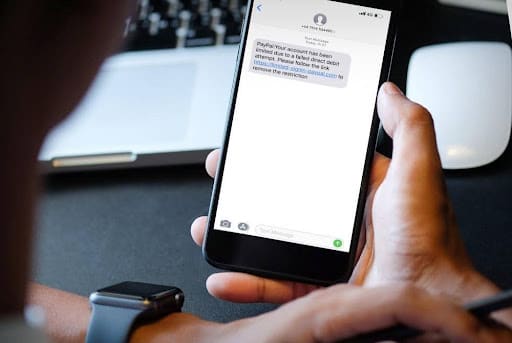
Imagine receiving a message saying your bank account has been blocked. You click the link, enter your details, and think everything is fine, not knowing you just gave your information out to a complete stranger and scammer at that!
This is how phishing scams work, and Microsoft has uncovered a massive cybercrime network that made these scams easier to carry out.
As a result, Microsoft and its cybersecurity partners were able to disrupt a network linked to more than one billion phishing messages targeting organizations worldwide in 2026.
Here is what happened and why everyday internet users should care.
What did Microsoft Discover?
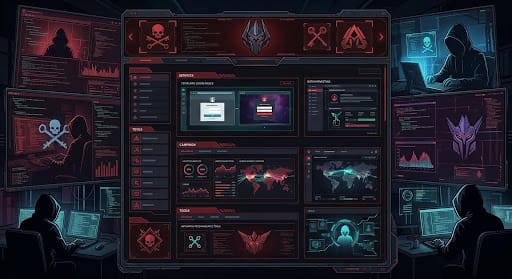
The investigation began after Japan’s National Police Agency reported a wave of scams targeting individuals and businesses. Microsoft discovered an underground marketplace called YAM Store, where criminals could obtain digital accounts, web hosting services, and tools for online scams. Two tools that stood out are CoGUI and Iron Man, CoGUI helped criminals create fake websites and messages that looked like they came from trusted organizations while Iron Man offered more than 2,300 ready-made templates impersonating banks, retailers, healthcare providers, police departments, and other organizations across more than 150 countries. Basically, criminals could use these tools to create convincing fake websites without building everything from scratch.
Think of it like ordering something from an online store, except the products are tools designed to help people scam others.
Microsoft reported that the network facilitated more than one billion phishing messages targeting approximately 75,000 organizations worldwide in 2026. Microsoft customers alone received more than 750 million of those messages. The operation was also linked to criminal profits worth tens of millions of dollars.
This shows that online scams are not always the work of one random person sending suspicious messages. Sometimes, they are part of a larger operation where criminals buy tools, create fake websites, and target people on a massive scale.
Why should you Care? You are probably a Target too
You might be thinking, “I am not a big company. Why would a hacker target me?” The truth is that anyone who uses a smartphone, email, social media, or online banking can become a target. Here are some examples you might recognize:
The fake bank message: You receive an SMS claiming your bank account has been restricted. It tells you to click a link to restore access. You enter your details, and the scammer may now have your login information.
The account suspension trick: An email claims your Google account will be suspended unless you verify your identity. The login page looks genuine, so you enter your password without realizing it is fake.
The fake giveaway: A social media account claims you have won a giveaway. You click the link and log in to claim your prize, only to risk handing your account details to a scammer. The lesson is simple: A familiar logo does not mean a message is genuine.

How do Phishing Scams actually Work?
Phishing is a type of online scam in which criminals pretend to be someone you trust to trick you into revealing sensitive information or taking an action that benefits them. That sensitive information could include your password, payment details, or other personal information.
The process is often simple.
First, the scammer creates a message that looks like it came from a trusted organization. Next, they send the message through email, SMS, or another communication channel. The message usually gives you a reason to act quickly. It might claim that your account has a problem, a payment has failed, or you need to confirm some information.
Then comes the link.
The link takes you to a website designed to look like the real thing. If you are not paying attention, you might enter your details without noticing anything unusual. Once the scammer collects your information, they may attempt to access your account, steal money, or use your details in other scams. The scary part is that these websites can look very convincing. And with criminals using ready-made templates, creating convincing fake websites can become much easier. This is why simply telling people to avoid suspicious-looking messages is not always enough. Some scams are designed to look completely normal.
Microsoft Fights Back
Microsoft worked with cybersecurity partners, including Proofpoint, and Japanese law enforcement to disrupt the operation. Following a court order in the United States, Microsoft and Health-ISAC seized and redirected domains connected to YAM Store, CoGUI, and Iron Man.
The operation also resulted in more than 20,000 connected accounts disabled and more than 100,000 domains blocked from being used for impersonation and fraud. This is a major disruption, but it does not necessarily mean every criminal involved has been caught. Some may attempt to rebuild their operations using different services. Taking away the tools and infrastructure criminals depend on can make it harder for them to carry out scams.
How to Protect Yourself from Phishing Scams?
You do not need to be a cybersecurity expert to stay safer online. Start with these simple habits, think before clicking any unexpected links, even if the message looks like it came from your bank or a trusted company. Always check website addresses carefully because scammers can create fake websites that look almost identical to the real ones. Never share your OTP, passwords, or verification codes with anyone who contacts you unexpectedly. You should also use two-factor authentication and create strong, unique passwords for your accounts to make them harder to access without permission.
If you receive an urgent message claiming that your bank account has a problem, do not panic or rush to follow the instructions. Instead, open your bank's official app or contact the bank through a verified channel to confirm whether the message is genuine. Avoid using the same password for multiple accounts, and be careful about the personal information you share online. If you accidentally enter your details on a suspicious website, change your compromised password immediately and contact your bank if your financial information may be at risk. Remember, even a convincing message can be fake. Always verify before sharing sensitive information.
Final Thoughts: Think before you click
The Microsoft investigation shows that behind a simple scam message, there may be a much larger criminal network supplying the tools needed to steal people's information. Although the takedown disrupted important parts of this operation, phishing remains a threat to anyone who uses the internet. For everyone, this means being careful with messages about bank transfers, deliveries, job offers, account verification, and online giveaways.
Not every link deserves a click, and not every message deserves your trust. Stay alert, verify first, and protect your information.

You might also like


Comments(0)
Be the first to comment.